
อ่านเว็บไซต์นี้เป็นภาษาไทย

The Workshop

Tools we built to build.

Our studio runs on software we made for ourselves. These tools are not products and not for sale. They are the reason our work moves the way it does.

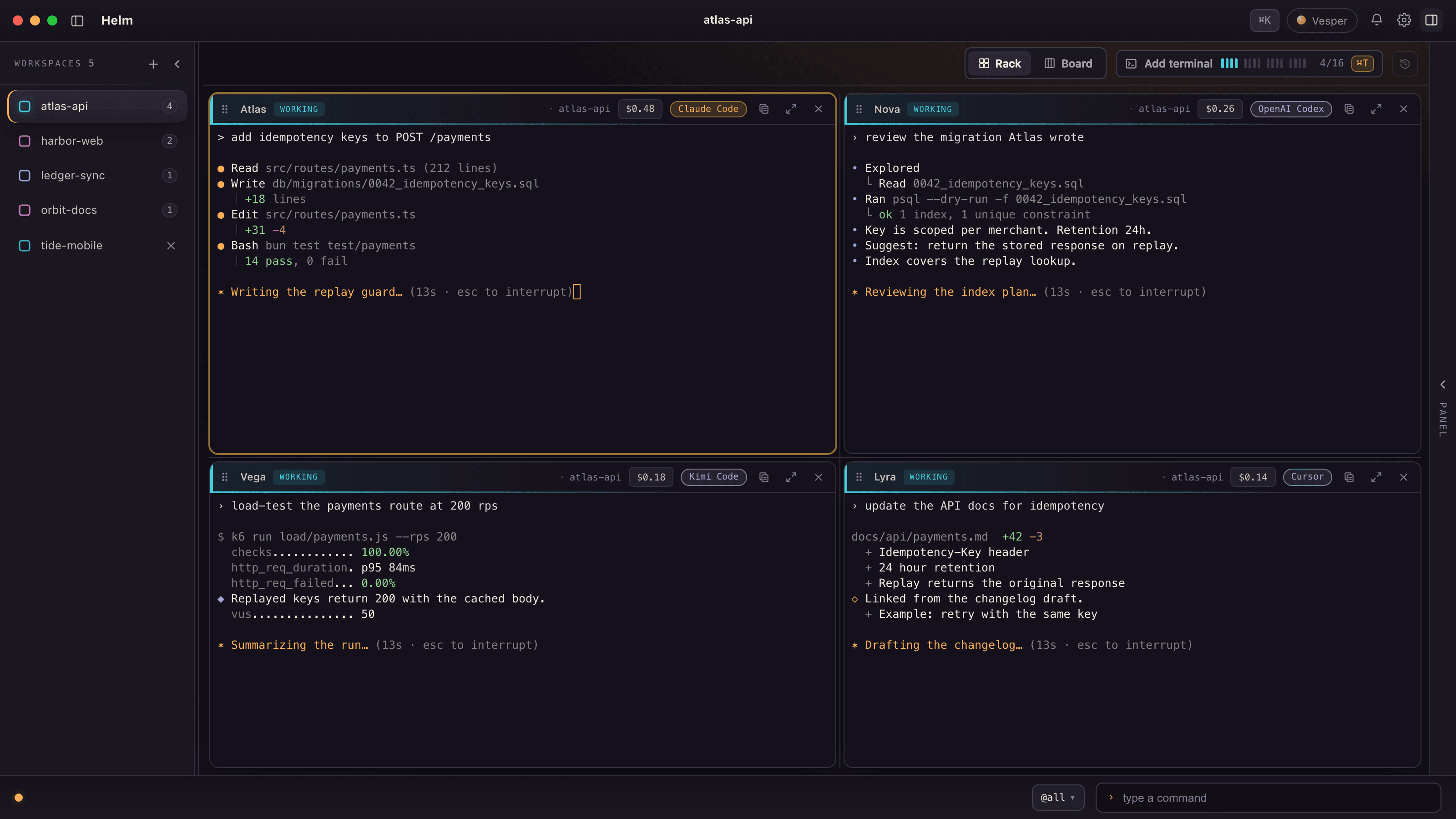
Helm on a dark desktop: a sidebar of five workspaces and a rack of four agent panes named Atlas, Nova, Vega and Lyra, each working on a fictional payments task.
Read the film as text
  1. [Ambient music throughout, no narration]
  2. A gold star in the dark. On screen: “One window.”
  3. The Helm window opens, split into panes with an agent at work in each. On screen: “A crew of agents.” “Claude Code, Codex, Kimi, Cursor.”
  4. Close on the pane headers, named Atlas and Nova. On screen: “Every one has a name.” “Say it, type it, route work to it.”
  5. The project list on the left switches from one project to another. On screen: “Every project in its own lane.”
  6. A message, “@Nova review the migration”, passes from one pane to Nova. On screen: “Work passes hand to hand.”
  7. Each pane’s cost ticks up: $0.38, $0.41, $0.61. On screen: “Every dollar on the record.”
  8. The Vesper panel answers “Where are we on payments?” with a summary of the crew’s work. On screen: “Vesper keeps watch.”
  9. Pull back to the whole window. On screen: “Helm.” “The system we build with.”
  10. The gold star and the VESPERWERK logo. On screen: “Built in-house at Vesperwerk.”

Helm

Mission control for a crew of AI agents.

Helm is the desktop app we build everything in. Claude Code, Codex, Kimi and Cursor each run in their own pane, side by side, with a name, a lane and a cost you can see.

Status: In daily use Real Helm interface, fictional project data.

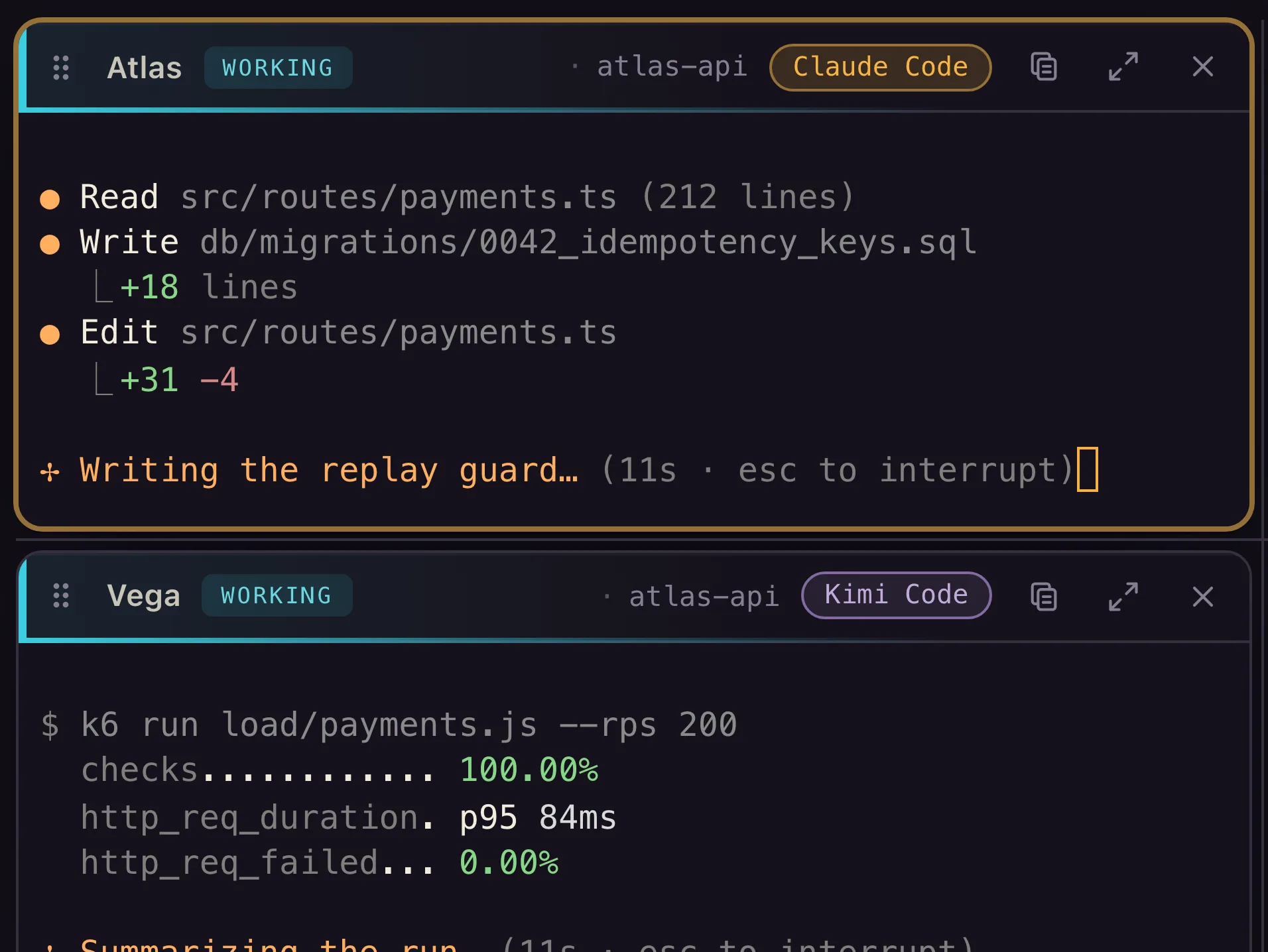
Helm pane headers: each agent pane shows its call-sign, a WORKING state and its engine, such as Atlas on Claude Code and Vega on Kimi Code.
  • Atlas
  • Nova
  • Vega
  • Lyra

Inside Helm

  1. Call-signed panes

    Claude Code, Codex, Kimi and Cursor each run in their own pane, with a short name you can say or type.

  2. The rack

    Every pane of a project in one grid. Maximize one, and the rest keep running.

  3. Vesper

    One orchestrator per workspace that plans, delegates and keeps watch, by chat or by voice.

  4. Hand-offs

    A pane passes work to a named sibling, which picks it up at its next turn without being interrupted.

  5. Cost per pane

    What each agent spends, to the cent, always on screen and never buried in a tab.

  6. Lanes per project

    Each workspace keeps its own crew and its own conversation, and keeps running in the background.

From the same bench

Two smaller instruments.

Built in the same family as Helm, and used alongside it every day.

Cadence

Status: In daily use

Thai and English voice dictation for developers.

  • One hotkey Press, speak Thai and English in the same sentence, press again. The text lands in whatever app has focus.
  • Knows your code A vocabulary built from the repository you are in, so identifiers come out spelled right.
  • Honest mic The mic is open only between your two hotkey presses, and the pill lights up only while it is listening.

Lens

Status: In daily use

One-hotkey screenshots, straight into an AI agent.

  • One hotkey Capture the window in front of you, a region or the whole screen.
  • One paste, two hands The image goes into a chat app, the cover-sheet path goes into an agent prompt.
  • Local by design Captures stay on your machine until you paste them somewhere, and sensitive areas can be masked before the image is written.

Built for us. Not for sale.

These are internal tools. There is no price, no waitlist and no download. What reaches you is the discipline behind them: we build client systems the same way.